
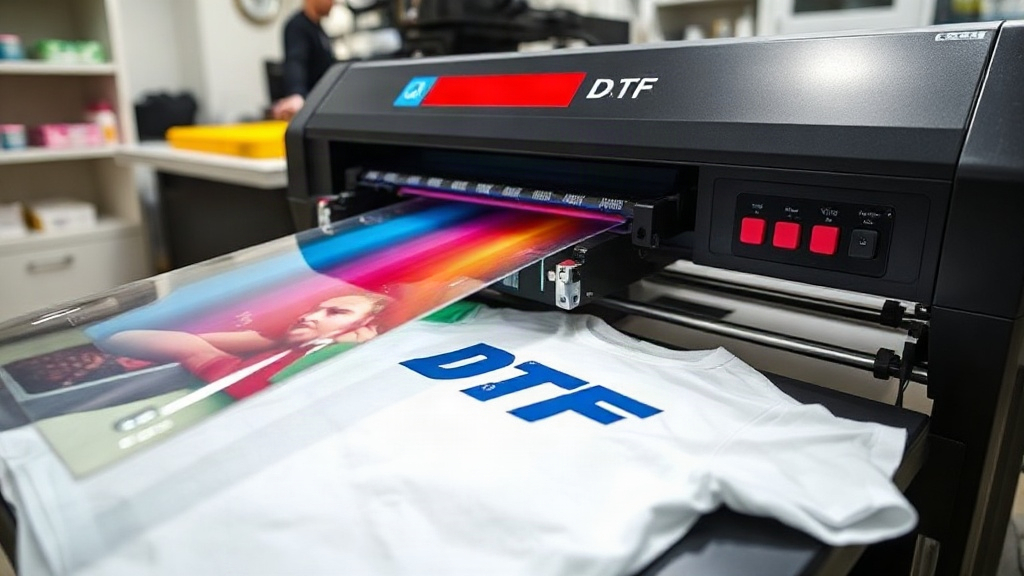
Transfer printing has revolutionized custom apparel, and DTF (Direct to Film) printing stands out for its versatility and vibrant results. Unlike other methods that require specific fabric types or extensive setup, DTF allows you to print intricate designs onto a wide range of materials, from cotton to polyester blends, with remarkable detail. Whether you're a small business owner or a hobbyist, mastering DTF printing can elevate your creations and open up new possibilities. In this guide, I'll share practical insights and tips I've gathered from years of working with DTF systems, so you can avoid common pitfalls and produce flawless transfers every time.
Understanding the DTF Printing Process
At its core, DTF printing involves printing your design onto a special film, applying a thermoplastic powder to the wet ink, and then curing it. The transfer is then pressed onto the fabric using a heat press. The magic lies in the powder, which adheres to the ink and, when heated, bonds with the fabric fibers, creating a durable, stretchable print. This process differs from DTG (Direct to Garment) or sublimation, as it separates printing from application, allowing for greater flexibility and efficiency.
Key Components of DTF Printing
To get started, you'll need:
- DTF printer: Typically a modified inkjet printer with white ink capability.
- DTF film: PET film coated for ink adhesion.
- DTF ink: CMYK plus white ink.
- Hot melt powder: TPU-based powder for bonding.
- Heat press: For transferring the design.
- Curing oven or heat gun: To melt the powder.
Each component plays a crucial role, and quality supplies directly impact your output. I've seen many beginners try to cut costs on film or powder, only to end up with cracked or faded prints. Invest in reputable brands to save yourself headaches.
Step-by-Step DTF Printing Workflow
Let's walk through the process from start to finish.
1. Design Preparation
Start with a high-resolution image. DTF printing can handle fine details, but low-res files will look pixelated. Use graphic software to mirror your design (unless your printer does it automatically) and adjust colors. Remember that white ink will be printed as a base, so you don't need to worry about light colors on dark fabrics.
2. Printing
Load your DTF film into the printer. Ensure the printer is set to the correct settings for film printing, typically a higher ink density. Print the design. The printer will lay down CMYK inks first, followed by a white ink layer. This white layer is crucial for opacity on dark garments.
3. Powder Application
While the ink is still wet, sprinkle hot melt powder evenly over the print. You can use a powder shaker for large batches or a manual method for small runs. Gently tilt the film to remove excess powder. You want a thin, even coating that sticks to the ink but doesn't clump.
4. Curing
Curing melts the powder into the ink, creating a flexible, bondable layer. You can use a curing oven set to around 160-170°C (320-338°F) for 2-3 minutes, or a heat press with low pressure for about 10-15 seconds. The powder should turn glossy and gel-like. Overcuring can make the transfer brittle, so keep an eye on it.
5. Transferring
Set your heat press to 160-170°C (320-338°F) with medium pressure. Place the transfer face-down on the fabric and press for 15-20 seconds. Let it cool completely before peeling the film. Cold peel yields the best results, as peeling while hot can stretch the design.
Choosing the Right Supplies for DTF Printing
Not all DTF supplies are created equal. Here's what to look for:
Film
Opt for double-sided matte film or film with a special coating for better ink absorption. Thicker films (75-100 microns) are more durable during handling.
Ink
Use DTF inks specifically formulated for your printer. Pigment-based inks are common, but you need a white ink that doesn't clog. Regular cleaning of printheads is essential.
Powder
TPU powder comes in fine and coarse grades. Fine powder (80-200 microns) works well for detailed designs, while coarser powder provides a stronger bond for large areas. Experiment to find what suits your needs.
Heat Press
A reliable heat press with accurate temperature control is a must. Uneven pressure or temperature can lead to poor adhesion. I recommend a press with digital controls and a pressure gauge.
Common DTF Printing Issues and How to Fix Them
Even with experience, you might run into problems. Here are some common issues and solutions:
Faded or Cracked Prints
This often results from insufficient powder or improper curing. Ensure the powder is evenly applied and fully melted. Also, check that your heat press settings are correct.
Ink Smudging
Smudging can occur if the film is moved before the ink dries or if too much ink is applied. Adjust your printer settings to reduce ink density and handle the film carefully.
Poor Adhesion
If the transfer peels off after washing, it could be due to undercuring, insufficient pressure during transfer, or incompatible fabric. Try increasing pressure or temperature slightly, and ensure the fabric is clean and dry.
Clogged Printheads
White ink tends to settle, so daily printing or automated cleaning cycles are necessary. Use a maintenance station and keep the printer in a dust-free environment.
Applications of DTF Printing
DTF printing is incredibly versatile. Here are some popular uses:
- Custom T-shirts: Ideal for small batches with complex designs.
- Sportswear: Stretchy and durable on polyester blends.
- Denim and Canvas: Works well on heavy fabrics.
- Accessories: Tote bags, hats, and more.
The ability to print on dark colors without a separate white layer makes DTF a go-to for vibrant apparel.
Frequently Asked Questions
What fabrics can I use with DTF printing?
DTF transfers work on almost any fabric, including cotton, polyester, blends, and even leather. However, fabrics with a rough texture or heavy coatings may require testing.
How do I wash DTF-printed garments?
Turn the garment inside out and machine wash cold. Avoid bleach and fabric softeners. Tumble dry low or hang dry. Proper care extends the life of the print.
Can I use a regular heat press for DTF?
Yes, but it must reach the required temperature (160-170°C) and provide even pressure. A clamshell or swing-away press works well.
How long does a DTF transfer last?
With proper application and care, DTF prints can last as long as the garment itself, often 50+ washes without significant fading.
Is DTF printing cost-effective for small businesses?
Absolutely. The low setup cost and ability to print on demand make DTF ideal for small businesses and startups. You can produce one-off items without minimum orders.
Mastering DTF printing takes practice, but with the right knowledge and supplies, you'll be creating professional-grade transfers in no time. Remember to experiment, stay patient, and enjoy the creative freedom this technology offers.